Some folders with important documents inside, you want to ' mark ' them with their own symbols to quickly distinguish the content that is inside that folder, then you can use the image annotation function. of the Shedko Badges program.
With this image caption feature, your important folder will be marked separately. In addition, this method will also make the user's desktop interface look more fancy. To exploit the image annotation feature, you need to install the program and then restart the computer. Shedko Badges will be integrated into the right-click menu and every time you right-click a folder, simply select the Badges feature that will open the annotated images for users to choose.
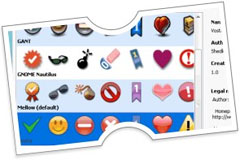 In addition to compatibility for folders, the Badges feature is also compatible when you use on disk partitions. This can be a good method if you are a forgetful person and cannot remember the importance of the documents in the folders.
Shedko Badges program currently has the latest version 1.5 with a capacity of 1.78MB which is compatible with Windows 9x / Me / 2000 / Xp / Vista operating systems. Interested readers can download the free version of this program from: http://eng.softq.org/badges.htm or download here.
Nguyen Thanh Luan
Annotate for folders with images
Some directories with important documents inside, you want to 'mark them' with their own symbols to quickly distinguish the content that is inside that directory, then use the annotation function with t image of the path
Keep exploring
More in Computer scienceBrowse the category
Next reads
Continue reading

Computer science
Why can't Cốc Cốc download videos to my computer?


Computer science
How to see the path of storm Ragasa updated every minute

Computer science
Top 10 most powerful supercomputers in the world

Computer science
Stop using your phone as a flashlight

Computer science