Cốc Cốc is a purely Vietnamese browser based on the Google Chrome source code. Cốc Cốc offers many convenient features such as fast web browsing, automatic Vietnamese typing, and free video downloads. However, in some cases, Cốc Cốc fails to download videos due to an error. This article explores the causes and some solutions for Cốc Cốc's inability to download videos to your computer.
Unable to download videos using Cốc Cốc because the Savior extension is disabled.
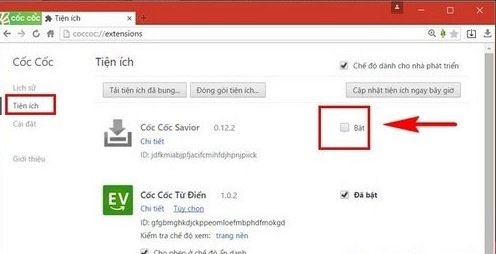
To continue downloading videos while browsing with this browser, simply reactivate the Savior extension by:
Go to Cốc Cốc > Settings > Select Extensions > Scroll down to find Savior and select Enable to re-enable this extension. If you see the Savior icon in green, it means you have successfully enabled the video downloading feature via Cốc Cốc.
The browser is outdated.
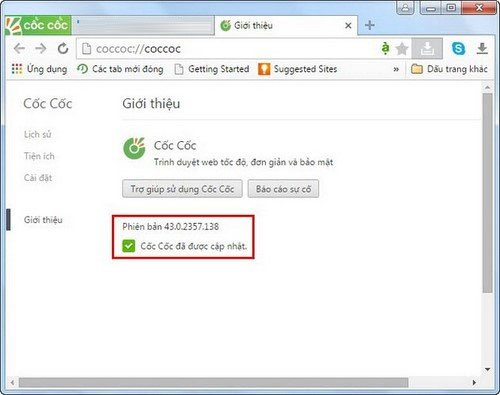
If the Cốc Cốc browser doesn't update automatically, it will become outdated and you won't be able to download videos. Check your current version and update to the latest version of Cốc Cốc for continued use.
- Instructions on how to view 3D images of animals such as lions, cats, dogs, horses, sharks, etc. on Google.
- What is a 403 Forbidden Error and how do I fix it?