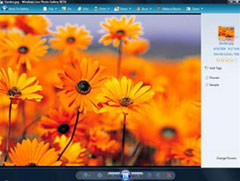
To support sharing images online, MSN has just released a tool called Windows Live Photo Gallery Beta. This is an interesting tool to help you manage photos and videos and allow you to share with friends and family via the internet.
The interesting features of Windows Live Photo Gallery Beta
Share your photos
The "Publish" button makes it easy to share your photos and videos over the web, you can also display your photos with sceensavers and beautiful slideshows.
 Find your photos and videos easily
Import your images from digital cameras, Windows Live Photo Gallery Beta will automatically recognize them in the event section based on the date and time. Keep your images organized automatically by name, date, classification and file type. Images are placed in the same position with the tags you added.
Highlight your photos and videos
Create an interesting panoramic view by combining multiple images. Record the moments by adding more lines. Highlight your image by adjusting the colors and layout. Improve your image simply with Crop tool (cropping) and red-eye fixes tool (anti-red eye)
If you want to try the Windows live photo beta gallery, download it here, which is a free trial version.
Huynh Thanh
Manage photos and videos with Windows live photo beta gallery
To support sharing images online, MSN has just released a tool called Windows Live Photo Gallery Beta. This is an interesting tool to help you manage photos and videos and allow you to share with friends and n
Keep exploring
More in Computer scienceBrowse the category
Next reads
Continue reading

Computer science
Why can't Cốc Cốc download videos to my computer?


Computer science
How to see the path of storm Ragasa updated every minute

Computer science
Top 10 most powerful supercomputers in the world

Computer science
Stop using your phone as a flashlight

Computer science